
For PBCs, RNTBCs and Aboriginal corporations
Every member, every notice, on record.
We build and look after websites and members portals for Aboriginal and Torres Strait Islander corporations. Meeting Ground, our members portal, runs under your corporation's name, reaches every member by email, phone alert and portal inbox, and keeps a delivery register your Board can rely on.
- Website and portal, or the portal alone
- Built on your rule book
- Works on any phone


Our services
A complete website and portal, or a portal for the website you have
Every corporation is different. We can build your public website and members portal together, or add the portal to your current website and work with your web provider to connect them.
Complete package
Website and members portal
A new public website for your corporation with the Meeting Ground portal built in. We design it, prepare the content with you, and look after it.
- Public pages for your corporation, Country, the Board, news, meetings, documents and annual reports
- Members sign in to the portal from your website
- Domain name, hosting, security updates and backups managed for you
- Content changes made on request
For an existing website
Members portal for your website
Keep the website you have. We set up the Meeting Ground portal and work with your web provider to connect it to your site.
- The portal at your own address, such as members.yourcorporation.org.au
- A Members sign-in button and menu link on your website
- We work directly with your current web provider or staff
- Where your website allows it, selected portal content shown on your pages
Why a members portal
“I never received it.”
When a meeting or a decision is challenged, the corporation has to show that proper notice reached every member. Spreadsheets, group emails and posted letters make that hard to prove.
Notices go missing
Emails bounce, addresses go out of date and some members never use email. Without a record, there is no way to show who was told.
Governance has many deadlines
Notice periods, AGM deadlines, proxies, quorum, membership applications, conflicts of interest and ORIC reports each have their own rules and dates.
Members are spread out
Members live across many towns and communities. They need meeting papers, news and a private way to contact the office from their phone.
How the portal works
How a notice reaches every member, with proof
The office writes one notice
Meeting Ground checks the notice period against your rule book, shows the latest send date, and flags missing proxy or online attendance wording before the notice is sent.
It reaches every member
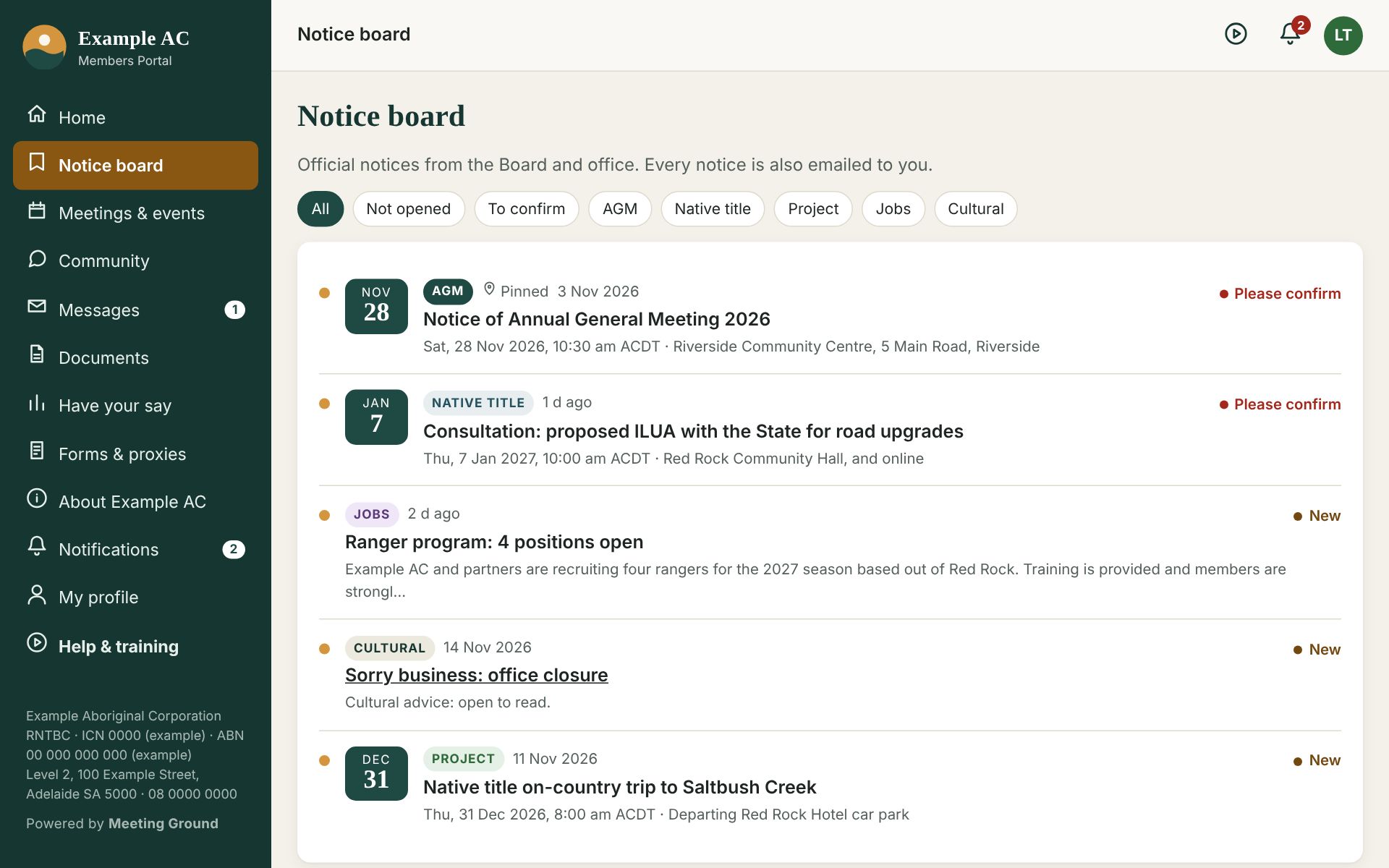
The notice goes by email, phone or computer alert and the portal inbox at the same time. Members without email are listed for a letter or a call.
The register keeps the proof
Each delivery, open and confirmation is recorded with how and when it happened, and reminders go out automatically. Export or print the register for the Board, the auditor or ORIC.
The notice period is checked before you send
Email notice counts from the next business day, and posted notice from a set number of days after posting, using your state's public holidays. The portal works out the latest date you can send and warns you if you're late.
- Templates for AGM business, director nominations, proxies, joining online and special resolutions
- Corrections after sending go to everyone who received the notice, and are recorded
- Copies go automatically to the contact person and auditor

Built on your rule book
Your rules, followed clause by clause
Each check follows the general requirement and shows the clause number from your rule book, so directors and members read the rules they know.
- Membership decided only by the Board, with who chaired the meeting recorded
- AGM timing, business and ORIC general, financial and audit reports
- Proxies, nominations, resolutions and requests for meetings, with due dates
- Conflict of interest register, record inspections, resignations and disputes
- Native title consultation and consent before native title decisions

For everyone
The right view for members, directors and the office
What members need, on their phone
- Notices with “please confirm” markers and cultural advice warnings
- Meetings, RSVPs and add to calendar
- Private messages with the office
- Documents, forms and proxies
- A members-only community space
- Their own contact details, kept up to date

What the Board must decide, in one place
- Membership applications to decide, without applicants' private contact details
- Members' requests, with the dates the rule book sets
- The conflict of interest register
- Directors-only notices and Board papers

Less paperwork for the office
- Send notices and follow the delivery register
- A dashboard of rule book and ORIC deadlines
- Import the register of members, with matched members given access straight away
- Record Board decisions, review forms and moderate the community
- Every action signed “Name (Job title)”

Your branding
Your corporation's name on every page
Your name, logo, colours and acknowledgement of Country appear in the portal, the emails and the phone alerts, and match your website.
Fictional corporations, shown for illustration.
Privacy and accountability
Members' information stays private, and every action is recorded
The database controls access
Access rules are enforced by the database, not just the screens. Members see their own details, directors see Board material, and office access is limited to employees and the contact person.
Every action is signed
Approvals, changes and decisions are recorded with the person's name and role, for example “Leanne Taylor (Office manager)”, never just “admin”.
Your own database, in Australia
Each corporation has its own database hosted in Australia. Your data is never mixed with another corporation's, and you can export it at any time.
Working with us
A clear process from first meeting to launch
Nothing goes live until your office and Board have reviewed and approved it.
Initial meeting
We learn about your corporation, your members and what you need from a website and portal.
Proposal and agreement
A written proposal with scope, timeline and fees, then a service agreement once your Board approves it.
Set-up and review
We build your website and portal, import your register securely, and your office and Board review everything.
Training and support
We train your staff and directors, launch to members, and provide ongoing support and maintenance.
Questions
Common questions
Who do you work with?
Prescribed bodies corporate (PBCs), registered native title bodies corporate (RNTBCs) and other Aboriginal and Torres Strait Islander corporations registered under the CATSI Act. The portal also suits any member organisation that needs to show it gave proper notice to every member.
Can you build our website as well?
Yes. Our complete package includes a public website for your corporation and the Meeting Ground members portal, designed together and looked after by us. We can move content across from your current website if you have one.
We already have a website. Can the portal work with it?
Yes. We set up the portal at your own web address, such as members.yourcorporation.org.au, and add a Members sign-in link to your website. We work with your current web provider on the changes. Where your website allows it, we can also show selected portal content, such as upcoming meetings, on your pages.
Does the portal run under our own name?
Yes. Members see your corporation's name, logo, colours and acknowledgement of Country on every page, in every email and in the phone alerts. Meeting Ground appears only as a small “Powered by” note.
Our rule book numbers things differently. Does that matter?
No. Each check is written against the general requirement, and we set the portal up with your clause numbers, notice period, proxy deadline, quorum, AGM deadline and financial year. Members and directors see your rule book's numbering.
Do members need to download an app?
No. Members open the portal in their phone's web browser and can add it to their home screen. It then opens like an app, shows alerts and always stays up to date, with nothing to install from an app store.
How do members get alerts when their browser is closed?
Once a member turns on alerts, their phone shows notifications even when the browser is closed. On Android this works from Chrome. On iPhone (iOS 16.4 and later), members first add the portal to their home screen and turn alerts on from there. Every official notice is also emailed, and members can choose text messages, so nobody relies on alerts alone.
What about members who don't use email?
The delivery register lists every member without an email address. The office prints letters from the register and records posting, phone calls and delivery in person, so the record covers every member.
Where is our data kept, and who owns it?
Each corporation has its own database, hosted in Australia. Your corporation owns its data and can export the member list, delivery registers and RSVPs as spreadsheets at any time. The database itself controls who can see what.
Talk to us about your corporation
Explore the live demo as a member, a director or the office, or book a walkthrough to discuss a website, the portal, or both.